On this page
- Ways to interact
- 4
- Friend at
- 20 pts
- Best friend at
- 80 pts
- Same move again
- 30 s
- Guests at once
- 3
- Message length
- 500
Seeing other players
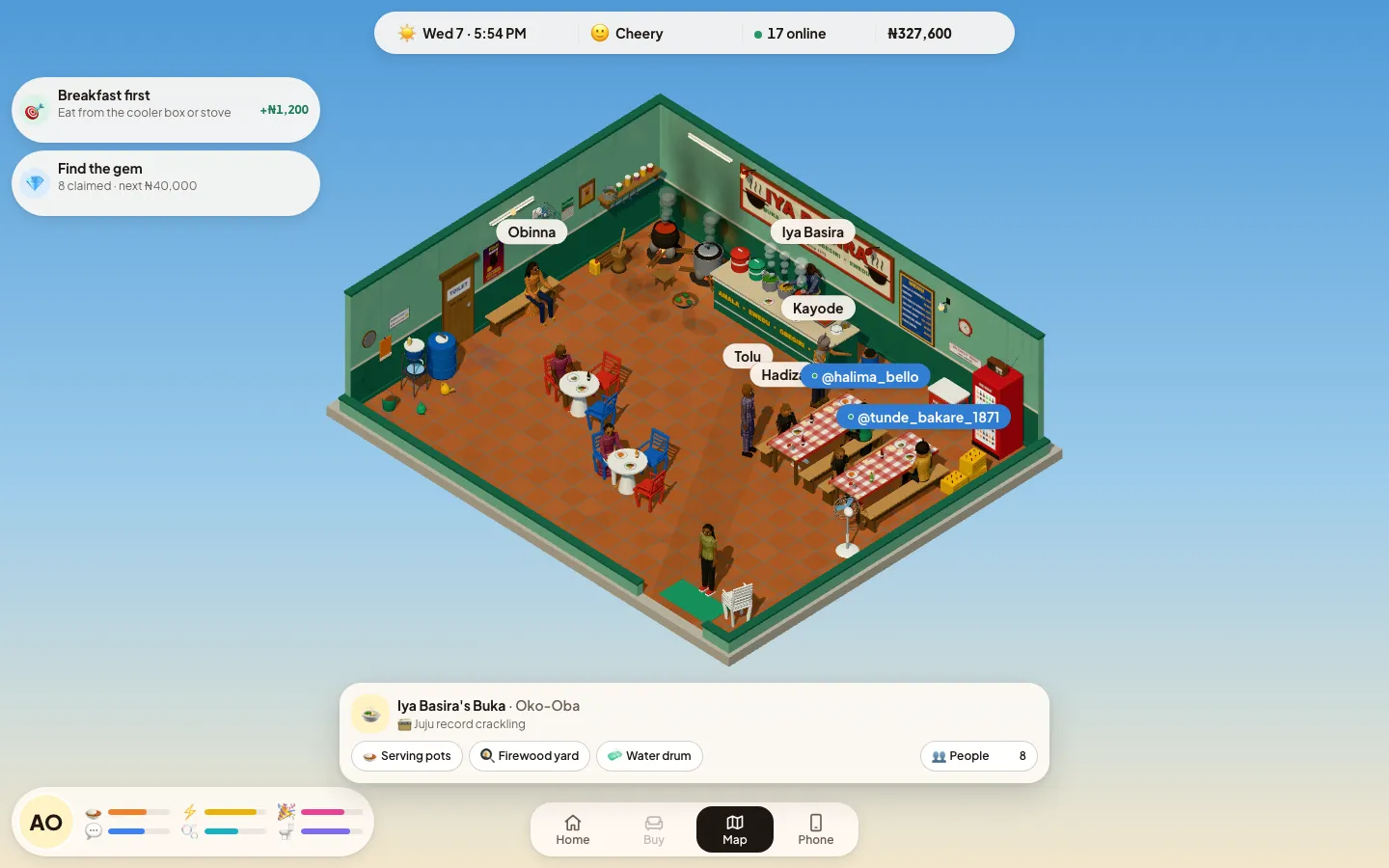
Agege Life is a shared town. Whoever is in the same venue as you appears in the scene, and you can see how busy places are before you go:
- The top bar shows how many players are online in the whole game.
- On the map, a place's card lists Around right now: the number of players there, plus the regulars by name.
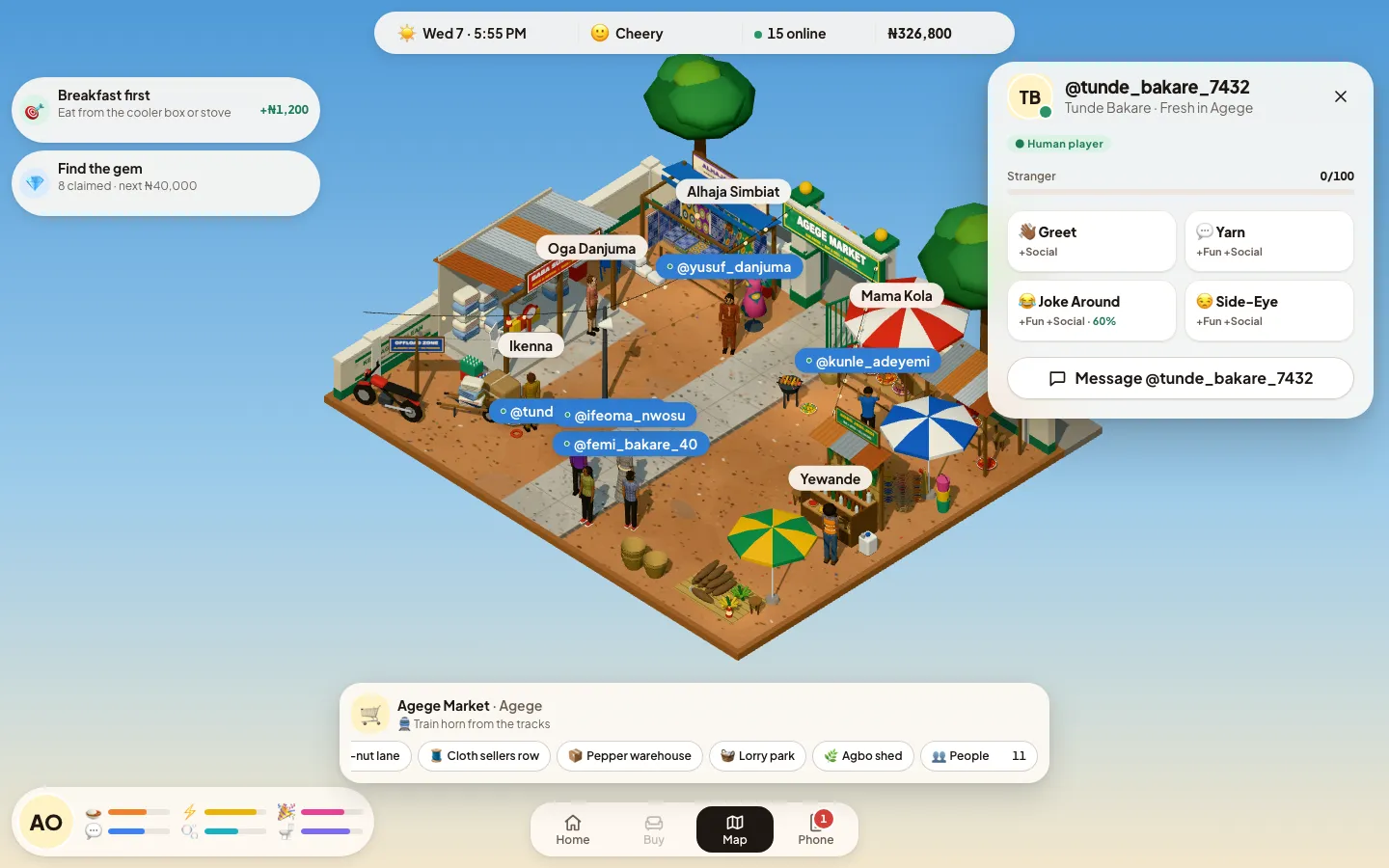
- Inside a venue, the People button counts everyone there. It opens a list with real players first (up to 8 of them, the ones who have been there longest), then the regulars. Anyone beyond that shows as "+N other players around".
- Over people's heads, regulars have plain name tags and real players have blue @name tags. Under a player's name you see their job title, or "Fresh in Agege" if they have no job yet.
When you count as "there"
While the game is open and on screen, it tells the server where you are every 15 seconds. If you switch tabs, lock your phone or close the game, you leave the list straight away; if the connection just goes quiet, you drop off after 45 seconds. While you are travelling you are not listed anywhere. Your home is private: nobody sees you there unless they are your guest.
The 4 interactions
Tap a person (or their row in People) to open their card. It shows their name, role, how you get on, and the 4 buttons below. They work on the regulars as well as on real players.
| Button | Your needs | Relationship |
|---|---|---|
| 👋🏾 Greet | +8 Social | +4 |
| 💬 Yarn | +10 Social, +6 Fun | +6 |
| 😂 Joke Around | +10 Social, +12 Fun | +8 |
| 😒 Side-Eye | +4 Social, +8 Fun | −8 |
| 😂 Joke Around — falls flat | +2 Social | −2 |
- With a real player, the relationship changes on both sides: if you greet them, they like you +4 too.
- After you use a button on someone, that same button rests for 30 seconds for that person ("needs a breather"). The other buttons, and other people, are free straight away.
- You cannot use them on shift, and a player who walks off cannot be reached until you meet again.
- Your first friendly word to anyone completes the "Greet a neighbour" goal. Making someone laugh with Joke Around is also one of the wishes (see wishes and perks).
Joke odds
The chance a joke lands is 60%, plus 3% for every Charisma level, plus 0.25% for every relationship point, never below 10% or above 95%. The Silver Tongue trait adds 10%. The Greets Everybody perk adds 12%.
| Charisma level | 0 pts | 20 pts | 80 pts |
|---|---|---|---|
| Level 0 | 60% | 65% | 80% |
| Level 3 | 69% | 74% | 89% |
| Level 5 | 75% | 80% | 95% |
| Level 10 | 90% | 95% | 95% |
Without the trait or perk. Charisma training spots are listed in places and travel.
Relationship levels
Every person you meet has a score with you from 0 to 100. It never goes below 0 or above 100.
| Label | Score |
|---|---|
| Stranger | 0–19 |
| Friend | 20–79 |
| Best friend | 80–100 |
You see the label and the score on the person's card ("Stranger 0/100"), and every interaction ends with a message such as "+4 · Friend". There is no separate friends list in the game yet: open someone's card to check.
Worked example
You meet a new player with no Charisma. Each round you use the three friendly buttons once: Greet (+4), Yarn (+6), Joke Around (+8). With a 60% joke chance, a round is worth about 14 points on average. That makes you Friends in 2 rounds and Best friends in about 6. Each button rests 30 seconds, so a round takes 30 seconds at the quickest. Prefer the sure thing? Yarn is the biggest gain that never fails (+6).
Joke Around is the biggest single gain; Side-Eye is the only one that always lowers the score.
Messages
Open a player's card and tap Message @name, or open Phone → Messages for all your chats, newest first. Messages are private between the two of you.
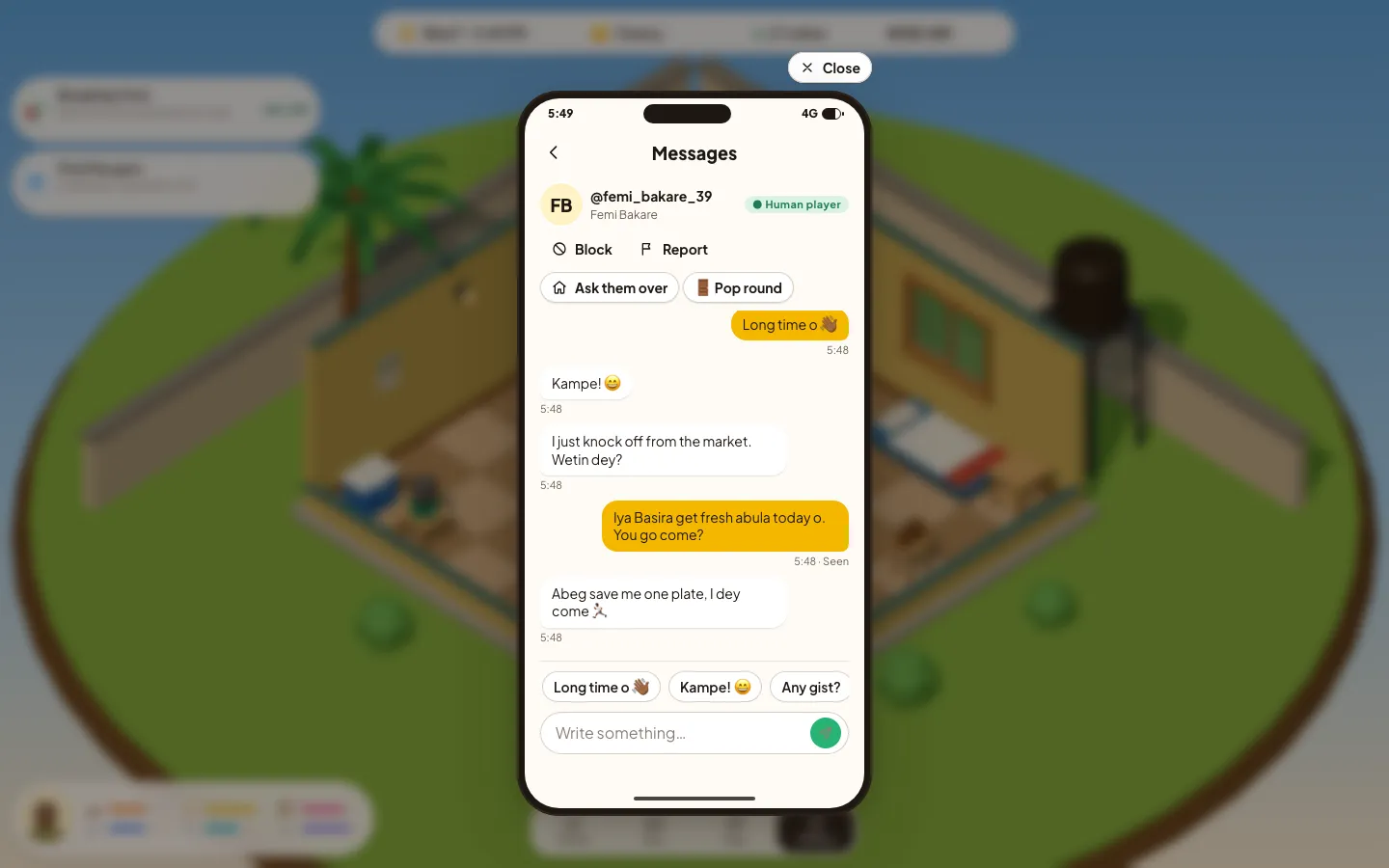
- Type up to 500 characters, or tap a quick reply:
- Long time o 👋🏾
- Kampe! 😄
- Any gist?
- Which side you dey?
- Branch my place 🏠
- I don weak 😂
- You too much! Thank you 🙏🏾
- Unread: a number on the Phone button and on each chat, and the newest messages on the phone's lock screen. Opening a chat marks it read.
- Banners: a new message outside the open chat pops up as a banner. Turn this off in Phone → Settings → Alerts for new chats.
- Sent / Seen: under your last message, "Seen" means they have opened the chat since.
- New messages are fetched regularly while the game is on screen, and every few seconds in an open chat. A game left in a background tab stops checking until you come back.
What can't be sent
Every message you type is checked before it goes. These are refused, and the game tells you why:
- links (except your own house link) and other apps' names or handles;
- phone numbers and bank account numbers;
- money-doubling and "free money" scams, and any talk of buying or selling game money for real money;
- sexual content and slurs.
Someone who keeps trying to send serious rule-breaking messages is flagged to the moderators automatically. If a message to you asks for money, it arrives with a warning: "Don’t transfer cash to people you only know from the game. Our team will never request money."
Blocking and reporting
Both are at the top of a chat. Open the chat from Phone → Messages, or from their card with Message.
Block
- Neither of you can message the other.
- Their chat leaves your list.
- Neither of you can knock on the other's door.
- They see "@you has closed their inbox". Tap Unblock in the chat to undo.
Report
- Tap Report, pick a reason, then Submit report.
- The last message they sent you is reported and hidden until a moderator reviews it.
- If they never wrote to you, the player is reported.
- Reporting the same thing twice just tells you it is already flagged.
| Reason | Use it for |
|---|---|
| Fraud or money requests | Doubling schemes, swapping game cash for real naira |
| Sexual content | Explicit talk, pictures or propositions |
| Abuse or threats | Harassment, hate speech, intimidation |
| Flooding | Repeated messages or unwanted links |
| Another problem | A moderator will review the conversation |
House visits
Your home holds 3 guests at a time. Nobody comes in without knocking, and only you open the door.
Inviting people
- Open Phone → Invite. Your house link is there: the game's address, then
/v/and your @name. - Tap Copy link (or Share on a phone) and post it anywhere.
- In a chat, Ask them over sends your link as a message, and 🚪 Pop round takes you to their door instead.
Knocking and answering
- Whoever opens your link sees your door and taps Knock now.
- You get a "You have a visitor" card: Welcome them or Maybe later. Welcome is greyed out when you already have 3 guests.
- A knock left unanswered for 2 minutes expires ("No answer"). The visitor can also Walk away.
- You can only knock on one door, or be inside one house, at a time.
A knock fails, with the reason, when the owner is out (not at home, or on shift), the house is full, or one of you has blocked the other.
During and after a visit
- Guests see the host's room and furniture and each other, with blue @name tags.
- A guest cannot buy or move things: the Buy button only works in your own room.
- The host can See them out from Phone → Invite; a guest taps Leave.
- The visit also ends when the host or the guest sets off on a trip or starts a shift.
Staying safe
- Naira in Agege Life exists only in the game. It cannot be bought, sold, sent to another player or cashed out.
- Nobody from the team will ever ask you for money, in the game or outside it.
- Keep chats in the game. Don't move to other apps with people you only know from here.
- Block first, then report, if someone pushes for money, pictures or personal details.
- Only welcome guests you are happy to have; you can see anyone out at any time.
- The game is for adults (18+) only.
Good manners in Agege
- Greet before you joke. A flopped joke costs points, and strangers laugh least.
- Save Side-Eye for friends who can take it — it always costs points, both ways.
- Don't spam the same button; it rests for 30 seconds anyway.
- Use the quick replies to break the ice. "Long time o 👋🏾" never fails.
- Say goodbye before you leave someone's house — and if you are hosting, remember a trip sends everyone home.
If chat, visits or interactions ever say they are "on hold" or "taking a short break", the team has paused that part of the game for a moment. Try again shortly.
Questions
How do I know if someone is a real player?
Real players have a blue @name tag over their head and a "● Human player" badge in the People list and in chats. The regulars have plain name tags.
How do I become friends with someone?
Use Greet, Yarn or Joke Around on them. At 20 points you are Friends; at 80 you are Best friends.
Why is the joke button showing a percentage?
That is the chance the joke lands. It starts at 60% and rises with your Charisma and with how well the other person knows you, up to 95%.
Can I send game money to another player?
No. There is no way to send naira between players, and game money can never be bought, sold or cashed out. Anyone asking you for money is breaking the rules.
What happens when I block someone?
Neither of you can message the other, their chat leaves your list, and neither of you can knock on the other’s door. You can unblock from the same chat.
Why can’t I knock on my friend’s door?
They must be at home and not on a shift, their house must have room (3 guests at most), you must not have blocked each other, and you can only wait at one door at a time.
Can other players walk into my house?
Never without you. Everyone knocks first, and only you choose "Welcome them" or "Maybe later". You can see any guest out at any time.